Apple's App Review Guidelines are the rulebook every iOS app has to pass. They read like a mix of legal text and friendly advice, and most of the rejections developers run into come from a handful of rules buried inside them. This page walks through the whole document, section by section, and points out the parts that actually get apps rejected.
This guide is based on the version Apple last updated on October 16, 2026. Apple calls the document a living one: new apps that raise new questions can lead to new rules at any time. Treat this as a map, and check the live text on developer.apple.com for anything borderline. If you want to know which rules apply to your app, the free App Review check asks a few questions and flags the guidelines your app could be rejected under.
How the guidelines are organized
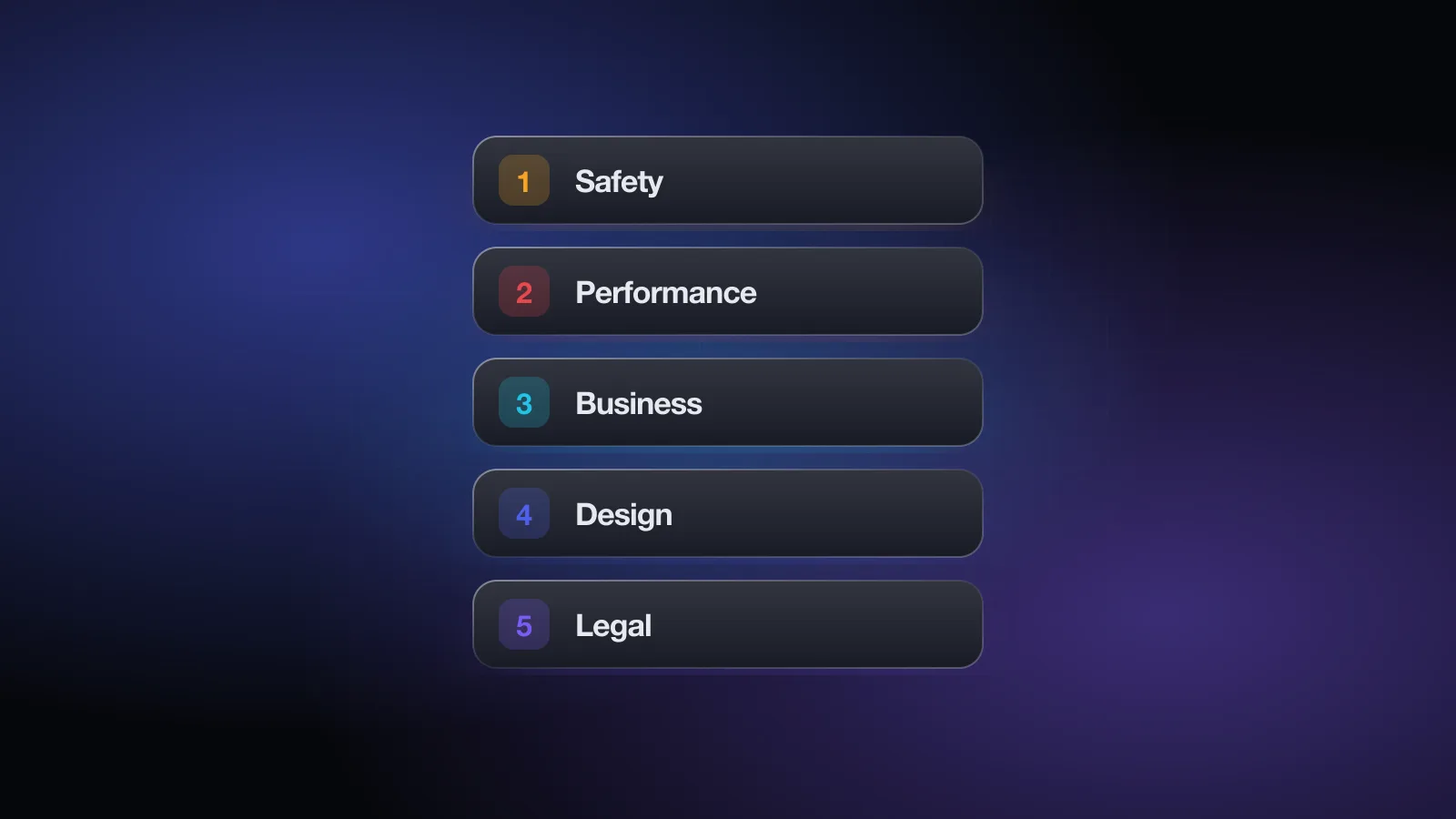
The document has an introduction, a "Before You Submit" checklist, five numbered sections and a closing "After You Submit" part. Every rule has a number, and those numbers are what you see in a rejection message. A rejection under 4.3 is about spam, one under 5.1.1 is about data collection, and so on.
- 1. Safety: content, user-generated content, kids, physical harm, developer contact details.
- 2. Performance: completeness, beta testing, metadata, hardware and software requirements.
- 3. Business: payments, in-app purchase, subscriptions and other business models.
- 4. Design: copycats, minimum functionality, spam, extensions, Apple services, login services.
- 5. Legal: privacy, intellectual property, gambling, VPN and device management, developer conduct.
The sections are not equal in practice. Apple's 2025 App Store Transparency Report reported 9.1M submissions reviewed and 2.09M rejected, and broke the rejections down by section:
One submission can be rejected under several sections, so the numbers add up to more than the total. The takeaway is simple: section 2 deserves most of your attention, and section 5 comes next.
The introduction and "Before You Submit"
The introduction sets the tone. Apple wants a curated store that is safe for users and fair to developers. A few points in it matter for every app:
- You are responsible for your SDKs. Ad networks, analytics services and other third-party code in your app have to comply too. If an SDK collects data you didn't declare, the rejection is yours.
- Gaming the system ends badly. Trying to trick the review process, copy another developer's work or manipulate ratings can get your apps removed and your account expelled.
- The App Store is not for private apps. If you only want to share an app with family and friends, Apple points you to installing from Xcode or Ad Hoc distribution instead.
- Kids matter. Apple expects you to make sure young users get age-appropriate experiences in your app.
The "Before You Submit" list is short and practical. Apple asks you to test for crashes and bugs, make sure all metadata is complete and accurate, keep your contact information current, give App Review full access (an active demo account or a fully featured demo mode, plus any hardware or sample QR codes needed), keep your backend live during review, explain non-obvious features and in-app purchases in the review notes, and include documentation for anything that needs regulatory approval.
Almost every item on that list maps to a common rejection. If you only do one thing before submitting, go through it line by line.
Section 1: Safety
Safety is about protecting users from harmful content and harmful behavior. It causes the fewest rejections of the five sections, but its rules are strict when they apply.
1.1 Objectionable Content
No defamatory or discriminatory content, realistic violence, overtly sexual material, inflammatory religious commentary or content that profits from current tragedies. One rule that surprises developers is 1.1.6: false information and trick functionality, such as fake location trackers, are not allowed, and labeling the app "for entertainment purposes" does not get around it. Apps for anonymous or prank calls and messages are rejected.
1.2 User-Generated Content
If users can post, upload, share or generate content (this explicitly includes social apps and AI content creation apps), the app needs four things: a way to filter objectionable material, a way to report content with timely responses, the ability to block abusive users, and published contact information. Missing report and block controls is the classic 1.2 rejection. Creator apps (1.2.1) also need age restrictions for content above the app's rating.
1.3 Kids Category
Apps in the Kids Category cannot link out, offer purchases or show other distractions unless they sit behind a parental gate. They should not include third-party analytics or advertising, with narrow exceptions, and they may not send personally identifiable or device information to third parties.
1.4 Physical Harm
Medical apps get extra scrutiny. If your app makes accuracy claims about health measurements, you need to disclose the data and methodology behind them, and apps that claim to measure things like blood pressure or blood oxygen using only the phone's sensors are not allowed. Apps should remind users to check with a doctor. If you have regulatory clearance, link to it in your submission.
1.5 Developer Information
Your app and its Support URL need an easy way to contact you. A support page that is just a logo, or a URL that returns an error, will fail here and under 2.1.
Section 2: Performance
Performance is where most rejections happen. It covers whether the app works, whether the listing tells the truth, and whether the code follows Apple's technical rules.
2.1 App Completeness
Apple wants to review a final version. That means no placeholder text, no empty websites, no crashes, working URLs, and demo account details if the app has a login (with the backend switched on). Guideline 2.1(b) adds that in-app purchases must be complete, visible to the reviewer and functional. If a configured purchase can't be found in the app, you need to explain why in your review notes. Apple says over 40% of unresolved issues relate to 2.1. The guideline 2.1 rejection guide covers the fixes in detail.
2.2 Beta Testing
Demos, betas and trial versions belong on TestFlight, not the App Store. TestFlight builds still have to follow the guidelines, and you can't distribute them to testers in exchange for any kind of compensation.
2.3 Accurate Metadata
Your listing is reviewed as closely as your binary. The subsections that cause the most trouble:
- 2.3.1: new features must be described specifically in the review notes. Generic notes can be rejected.
- 2.3.2: make it clear in the description and screenshots when featured items require extra purchases.
- 2.3.3: screenshots must show the app in use, not just title art, a login page or a splash screen.
- 2.3.6: answer the age rating questions honestly.
- 2.3.7: app names are limited to 30 characters, and metadata can't be packed with trademarks, other app names or pricing.
- 2.3.8: icons, screenshots and previews must suit a 4+ audience even if the app is rated higher.
- 2.3.10: no names, icons or imagery of other mobile platforms.
- 2.3.12: "What's New" text must describe significant changes.
See the guideline 2.3 rejection guide for examples, and how to write your title and subtitle for metadata that is both compliant and searchable. The character counter helps with the 30-character limits.
2.4 Hardware Compatibility
Guideline 2.4.1 says iPhone apps should run on iPad whenever possible. In practice, test your iPhone app on an iPad or the iPad simulator, because a broken layout there is an easy rejection to avoid. Apps also shouldn't drain the battery, overheat the device or ask users to change unrelated system settings (2.4.4).
2.5 Software Requirements
These are the technical rules: public APIs only (2.5.1), no downloading code that changes the app's features after review (2.5.2), background modes only for their intended purpose (2.5.4), full support for IPv6-only networks (2.5.5), explicit consent and a clear indicator when recording the camera, microphone or screen (2.5.14), and no hidden or undocumented features (2.5.19). Display advertising must stay in the main app, not in widgets, extensions or notifications (2.5.18).
Section 3: Business
The Business section covers how you make money. Apple also says that if your business model isn't obvious, you should explain it in your metadata and review notes, because a reviewer who can't work out your purchases will slow down or reject the review.
3.1.1 In-App Purchase
If you unlock features or content inside the app, such as subscriptions, game currency, premium content or a full version, you must use in-app purchase. License keys, QR codes and similar unlock mechanisms are not allowed. Purchased credits can't expire, and restorable purchases need a restore mechanism. Loot boxes must show the odds before purchase. The guideline 3.1.1 rejection guide goes through the common cases.
The rules on linking to outside purchase methods differ by storefront. The current text says the restriction on buttons, external links and other calls to action does not apply on the United States storefront, while other regions rely on specific entitlements. Read 3.1.1(a) and 3.1.3 for each region you sell in.
3.1.2 Subscriptions
Auto-renewable subscriptions must provide ongoing value, last at least seven days and work across all the user's devices. Before asking someone to subscribe, you have to describe clearly what they get for the price (3.1.2(c)). Paywalls that hide the billed amount, the renewal terms or the trial terms are a frequent rejection. Apps that trick users into subscribing get removed. See the guideline 3.1.2 rejection guide.
3.1.3 Other purchase methods
Some apps can take payment outside in-app purchase: reader apps for previously purchased content, multiplatform services, enterprise services, real-time person-to-person services, and physical goods or services consumed outside the app (which must not use in-app purchase).
3.2 Other business model issues
A few rules here catch indie apps. 3.2.2(x) forbids forcing users to rate or review the app, or download other apps, to unlock functionality. 3.2.2(iii) rejects apps designed mainly to show ads. 3.2.1(viii) requires financial trading and money management apps to be submitted by the licensed institution.
The free App Review check asks about sign-in, purchases, privacy and content, then lists the guidelines your app could be rejected under with a fix for each. It takes about two minutes, no sign-up.
Section 4: Design
Design sets the minimum bar for an app to be worth listing. These rules are the hardest to argue with, because they involve the reviewer's judgment about quality and originality.
4.1 Copycats
Don't copy a popular app with small changes, don't impersonate other apps or services, and don't use another developer's icon, brand or product name without approval.
4.2 Minimum Functionality
Your app needs to do more than a repackaged website. Apps that are mainly marketing material, web clippings, content aggregators or a collection of links are rejected (4.2.2). Apps must work on their own without another app (4.2.3), and if they download large resources at first launch, they must show the size and ask first. Apps built from commercial templates are rejected unless the content provider submits them (4.2.6). Read the guideline 4.2 rejection guide if your app is a thin wrapper around web content.
4.3 Spam
4.3(a) rejects multiple bundle IDs for the same app, such as one app per city. 4.3(b) rejects apps that are indistinguishable from what's already widely available. Apple names dating, flashlight, sound effects, wallpaper, simple timers and fortune telling as categories that need a meaningfully different or improved experience. The guideline 4.3 rejection guide explains how to show your difference.
4.5 Apple Sites and Services
Don't scrape Apple sites. Push notifications can't be required for the app to work, and marketing pushes need explicit opt-in plus an in-app way to opt out (4.5.4).
4.7 Mini apps, chatbots and plug-ins
Apps can offer HTML5 mini apps, mini games, streaming games, chatbots and plug-ins, but you are responsible for that software. It has to follow the privacy rules, include filtering, reporting and blocking, and use in-app purchase for digital goods.
4.8 Login Services
If you use a third-party or social login (Google, Facebook, X and others) for the primary account, you must also offer an equivalent login that limits data to name and email, lets users keep their email private and doesn't collect interactions for advertising without consent. Sign in with Apple meets this. There are exceptions, for example apps that only use your own company's account system, education or enterprise apps using existing accounts, and clients for a specific third-party service. See the guideline 4.8 rejection guide.
4.10 Monetizing built-in capabilities
You can't charge for features the hardware or OS already provides, such as push notifications, the camera or iCloud storage.
Section 5: Legal
Legal is the second-largest source of rejections, mostly because of privacy. Apple also reminds you that local laws apply in every region where your app is available, not just the guidelines.
5.1.1 Data Collection and Storage
This is the most cited privacy rule. In short:
- (i) A privacy policy linked both in App Store Connect and inside the app, explaining what you collect, how it's used, how third parties protect it, and how users can request deletion.
- (ii) User consent before collecting data, purpose strings that clearly explain the use, and a way to withdraw consent.
- (iii) Only the data the core feature needs. Use system pickers instead of full Photos or Contacts access where possible.
- (iv) Respect permission choices and don't pressure people into granting access. Offer an alternative when they decline.
- (v) Let people use the app without a login if it has no significant account-based features, and if users can create an account, let them delete it from within the app.
Missing in-app account deletion and vague purpose strings are two of the most avoidable rejections on the store. The guideline 5.1.1 rejection guide walks through each one.
5.1.2 Data Use and Sharing
You need permission before using or sharing personal data, and the current text says you must clearly disclose sharing with third parties, including third-party AI, and get explicit permission first. Tracking requires the App Tracking Transparency prompt. You can't make features depend on enabling push notifications, location or tracking.
5.1.4 and 5.1.5: Kids and location
Apps for kids must follow laws like COPPA and GDPR and should avoid third-party analytics and advertising. Terms like "For Kids" in metadata are reserved for the Kids Category. Location should only be used when it is directly relevant to the app's features, with consent and a clear explanation.
5.2 Intellectual Property
Only use content you created or have a license for. If you display content from a third-party service, you must be allowed to under its terms, and you may be asked for authorization. Don't imply Apple endorses your app.
5.3, 5.4 and 5.5: Regulated categories
Real-money gaming needs licensing, geo-restriction and a free app. VPN apps must use NEVPNManager and be offered by organizations. Device management apps need Apple's approval for the capability. Expect extra review time in these categories.
5.6 Developer Code of Conduct
Treat users and Apple with respect, don't trick customers, keep your developer identity accurate, and don't manipulate charts, search or reviews. Use Apple's provided API to ask for ratings, because custom review prompts are disallowed (5.6.1).
After You Submit
The closing part of the guidelines explains how the process works once you press Submit:
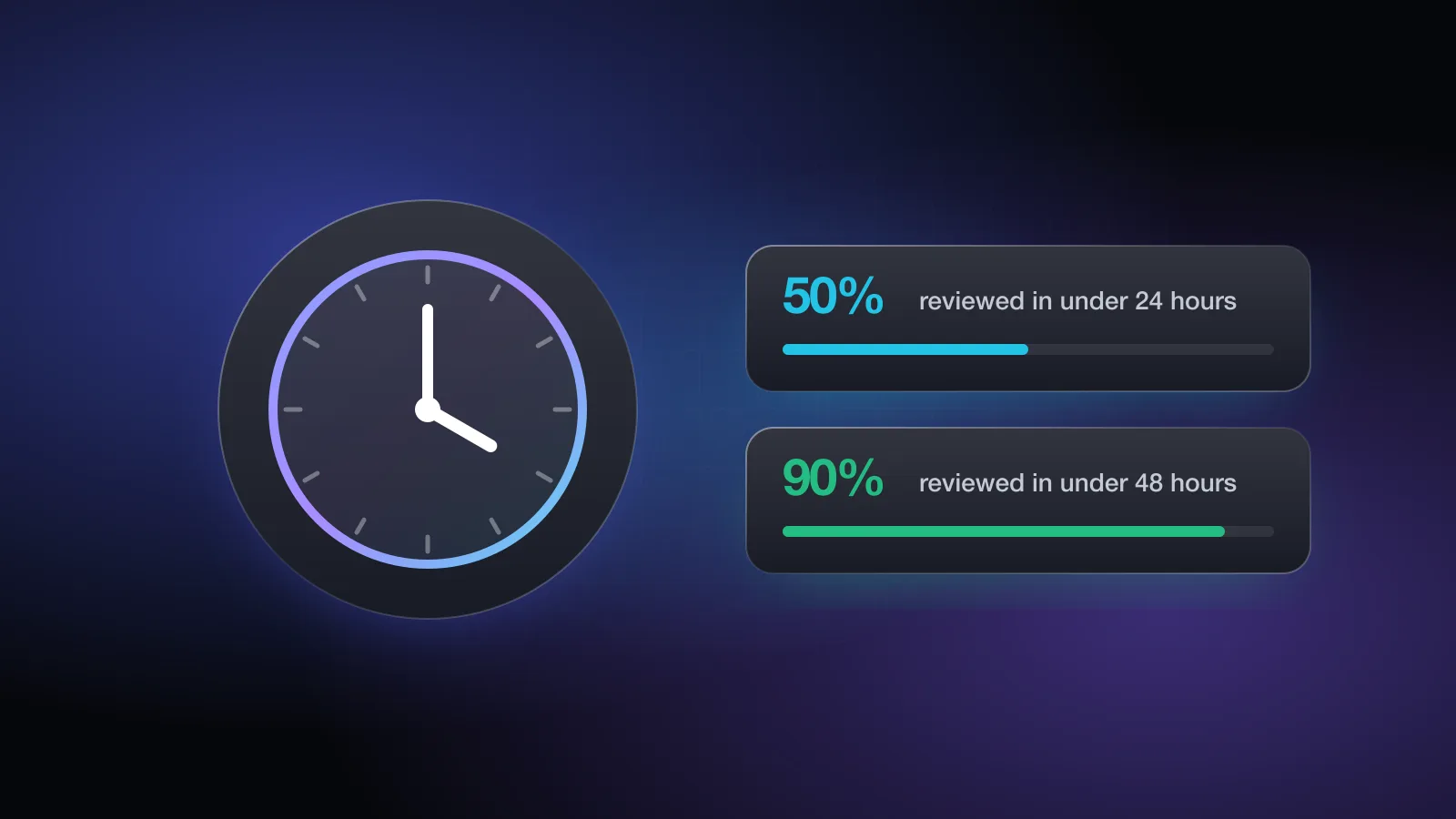
- Timing: complex apps or apps that raise new issues may need more scrutiny, and repeated rejections for the same guideline make later reviews slower. See how long App Store review takes for Apple's stated review times.
- Status updates appear in App Store Connect.
- Expedite requests are for critical timing issues only. Apple may stop accepting your requests if you abuse them.
- Release date: if you set a future date, the app won't appear before it, and it can take up to 24 hours to show up on all storefronts.
- Rejections: reply through App Store Connect to ask questions or add information.
- Appeals: if you disagree with the outcome, you can appeal to the App Review Board.
- Bug fix submissions: for apps already on the store, bug fixes won't be held up over guideline issues unless they involve legal or safety concerns. You agree to fix the issue in your next submission.
For what to say when a rejection lands, read the most common App Store rejections and how to avoid them.
Quick-reference table
The guidelines that cause the most rejections, in one place:
| Guideline | What it requires | Typical rejection trigger | Read more |
|---|---|---|---|
| 1.2 | Filtering, reporting, blocking and contact info for user content | No report or block option | |
| 2.1 | A final, working build with reviewer access | Crash, placeholder, no demo account | 2.1 guide |
| 2.3 | Metadata that matches the app | Screenshots that don't show the app in use | 2.3 guide |
| 2.5.1 | Public APIs, used as intended | Deprecated or private APIs in old SDKs | |
| 3.1.1 | In-app purchase for digital unlocks; restore option | Web checkout or unlock codes for features | 3.1.1 guide |
| 3.1.2 | Clear subscription terms before purchase | Billed price or renewal terms hidden | 3.1.2 guide |
| 4.2 | An app-like experience beyond a website | Web view wrapper or link list | 4.2 guide |
| 4.3 | One app per concept; something new in crowded categories | Near-duplicate apps or templates | 4.3 guide |
| 4.8 | A privacy-friendly login option next to social logins | Google login without Sign in with Apple | 4.8 guide |
| 5.1.1 | Privacy policy, consent, data minimization, in-app account deletion | "Email us to delete your account" | 5.1.1 guide |
| 5.1.2 | Permission before sharing data, ATT for tracking | Undisclosed sharing with a third-party AI | |
| ITMS-91053 | Required reason APIs declared in the privacy manifest | SDK without a privacy manifest | ITMS-91053 guide |
Checking your app against the guidelines
Reading the guidelines once is useful. Applying them to your own app is harder, because the rules that matter depend on what the app does: whether it has sign-in, how it charges, which permissions it asks for, and whether users can post content.
- List what your app doesSign-in methods, account creation, purchases, permissions, SDKs, user content, AI features, and whether kids are in the audience.
- Find the matching rulesUse the quick-reference table above. Social login points to 4.8, account creation to 5.1.1(v), subscriptions to 3.1.2, user posts to 1.2.
- Test like a reviewerClean install, physical device, latest iOS, then an iPad. Sign in with the demo account you'll give Apple.
- Write specific review notesExplain non-obvious features, where purchases live and how to reach anything gated.
- Run a final checkThe free App Review check does steps 1 and 2 for you and lists each risk with the guideline number and a fix.
Answer a few questions about your app, add your store text if you like, and get a list of rejection risks with the fix for each. Free, no sign-up.
For a deeper pass, the Pre-Review Check inside Appsium also reads screenshots of your paywall, sign-in and permission screens, reviews your store text, cross-checks your answers against the screens and drafts your App Review notes. No tool can promise approval, because Apple makes the call, but catching these issues first saves you a round trip. When the app side is ready, pair it with the ASO launch checklist so the listing is ready too.
Frequently asked questions
What are the App Store Review Guidelines?
They are the rules Apple's App Review team uses to decide whether an app, update or in-app purchase can go on the App Store. They are split into five sections: Safety, Performance, Business, Design and Legal, plus notes on what to do before and after you submit.
When were the App Review Guidelines last updated?
The version this guide is based on was last updated on October 16, 2026. Apple changes the document whenever new questions come up, so check the live page on developer.apple.com before relying on any single rule.
Which guideline causes the most rejections?
Apple says over 40% of unresolved issues relate to guideline 2.1, App Completeness. In the 2025 Transparency Report, the Performance section, which includes 2.1, accounted for more rejections than any other section.
Do the guidelines apply to in-app purchases and metadata too?
Yes. Apple reviews app binaries, updates, in-app purchases, in-app events and your App Store metadata, including screenshots, descriptions and privacy information.
Is a privacy manifest part of the App Review Guidelines?
Not as a numbered guideline. Missing required reason API declarations are flagged by App Store Connect when you upload a build (for example ITMS-91053), but they relate closely to the privacy rules in 5.1 and the software rules in 2.5.
Can I get my app approved by following the guidelines?
Following them removes the most common reasons for rejection, but Apple has the final say. The guidelines themselves say they are a living document and that new apps can lead to new rules.