Your app is reviewed by a person with a quota, a checklist and roughly the time it takes to drink a coffee. They read your listing in every language, install the build, try to sign in and walk through the main features on an iPhone and an iPad. If something blocks them in those minutes, the most likely outcome is a rejection, not a follow-up question.
Apple says very little publicly about how App Review is organized. The most detailed account comes from Phillip Shoemaker, who ran App Review from 2009 to 2016 and wrote about it in October 2026. This guide combines Apple's own published numbers with his firsthand description, marks which is which, and turns both into a checklist you can use before you submit.
The scale App Review works at
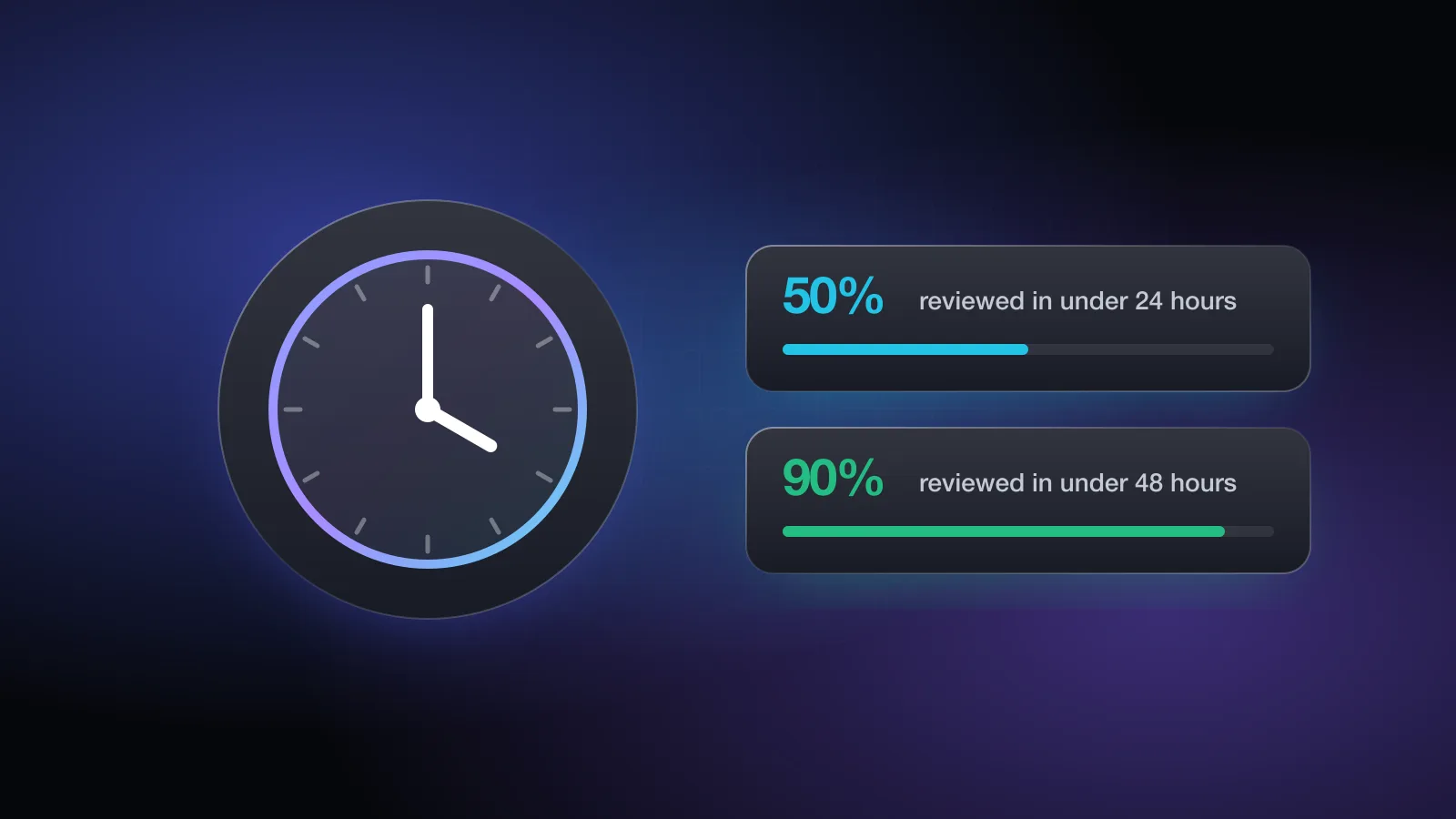
Apple publishes a yearly App Store Transparency Report. For 2025 it reports:
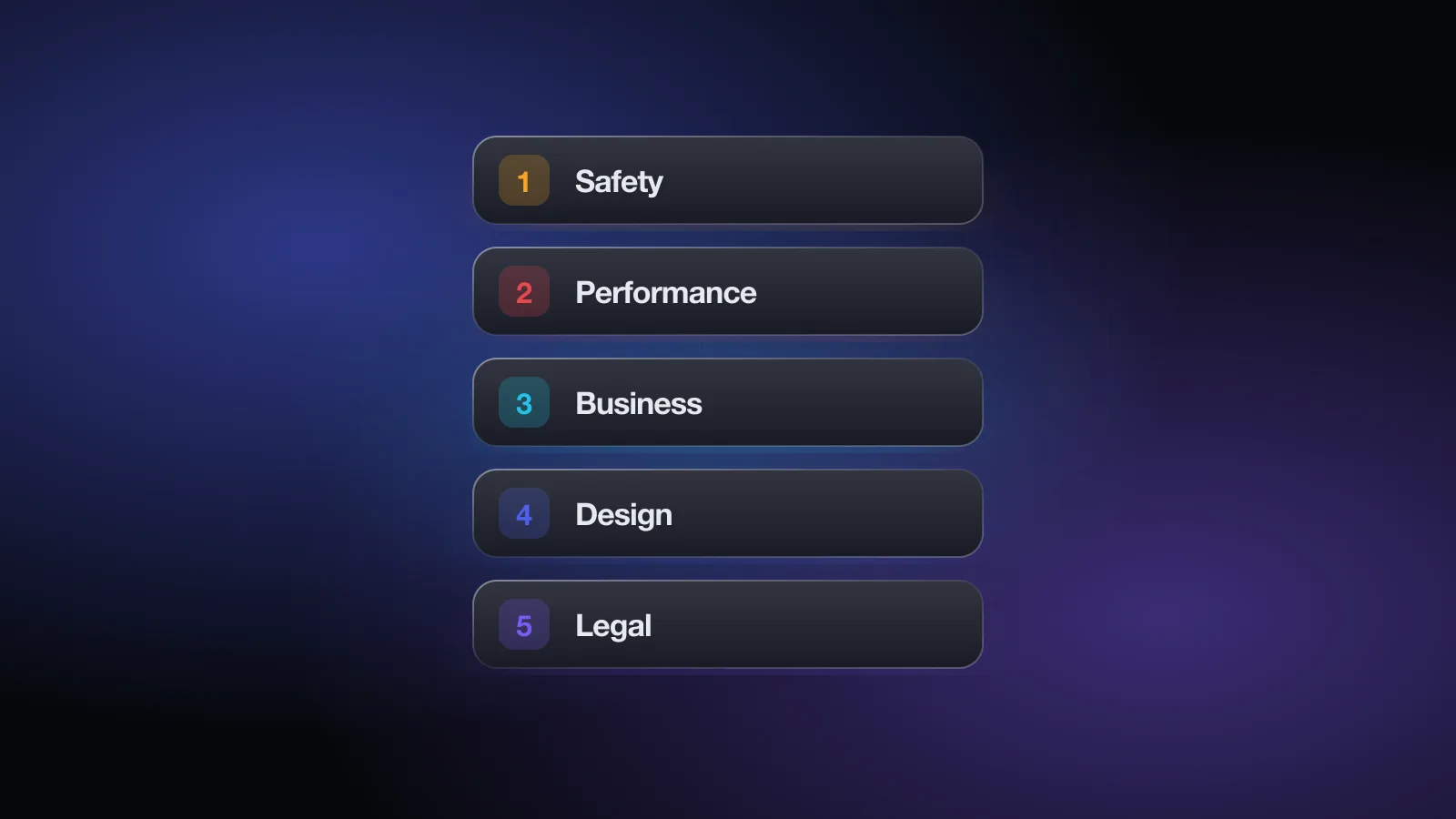
Performance problems were the biggest rejection category by far, ahead of Legal, Design and Business. That lines up with Apple's statement that over 40% of unresolved issues fall under guideline 2.1, App Completeness: crashes, broken links, placeholder content and missing sign-in details.
Shoemaker cites a team of around 450 reviewers handling more than 100,000 apps a week. He doesn't say how current that headcount is, but even with generous assumptions the math is the same: each reviewer works through dozens of submissions a day. That is the single most useful fact for anyone preparing a submission.
Who the reviewers are
Apple doesn't describe its reviewers publicly. Shoemaker's account of his own team is the best picture available:
- Most came from Apple retail. He estimates around 80% were former Apple Store staff, many from the Genius Bar. They know iPhones and iPads well and are used to seeing apps from a customer's side. They aren't necessarily engineers.
- Teams are organized by language. Hiring tested language skills, and review teams were split by language: Spanish, Chinese, Japanese, German, Turkish and many more, with the size of each team following submission volume. Your app's primary language decides which team picks it up.
- Training is short and continuous. New reviewers had about three weeks of classroom training, and a small internal team retrained everyone whenever the guidelines changed.
- Technical cases go elsewhere. When automated checks flag something like private API use, the app leaves the normal queue and goes to engineers who look at the binary.
In his time, all review happened in Cupertino and Sunnyvale. He says reviewers now also work from other locations, including the Philippines and Ireland, though he doesn't say how he knows.
What a reviewer checks in those minutes
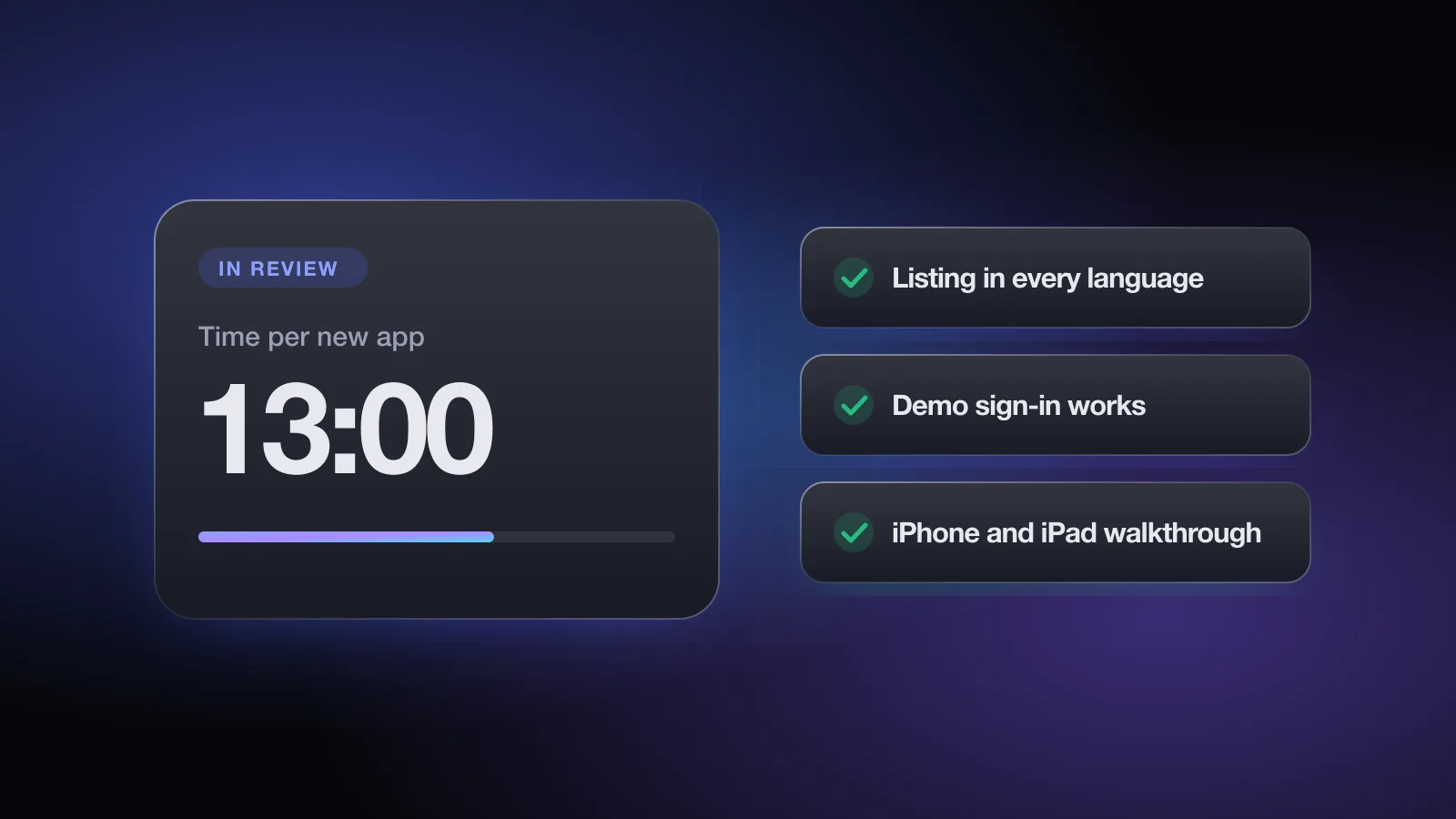
Shoemaker puts the target time, during his tenure, at about 13 minutes for a new app and about 6 minutes for an update. Apple doesn't publish a figure, so treat it as an order of magnitude. Within that window a review covers two things.
1. The listing, in every language
Reviewers check the metadata for every localization, not just the primary one: name, subtitle, icon, screenshots, description, keywords, age rating and in-app purchases. A screenshot that shows another platform's UI, a price in the app name or a keyword stuffed with a competitor's brand in a language you barely maintain can all trigger a guideline 2.3 Accurate Metadata rejection.
2. The app itself, on iPhone and iPad
The reviewer installs the build on the current iOS version and walks through it on both iPhone and iPad, even if your app is iPhone-only, since iPhone apps also run on iPad. They try to sign in, open the main features and reach anything you sell.
| What the reviewer does | What stops them | Typical result |
|---|---|---|
| Reads your review notes | No notes, or notes that pitch instead of explain | Questions, delay |
| Signs in with your demo account | Expired password, SMS code, empty account | Rejected, 2.1 |
| Opens the core features | Crash, blank screen, server down, placeholder text | Rejected, 2.1 |
| Finds and tests purchases | Products not submitted, paywall hard to reach | Rejected, 2.1 or 3.1 |
| Judges whether the app is useful | Looks like a wrapped website or a template | Rejected, 4.2 or 4.3 |
| Compares the listing to the app | Screenshots or description promise features that aren't there | Rejected, 2.3 |
Notice that most of these failures have nothing to do with the quality of your idea. They are access problems. The reviewer couldn't get to the part of the app that would have passed.
What reviewers can see beyond your build
A submission isn't reviewed in isolation. According to Shoemaker:
- Your full review history. Earlier rejections, the notes previous reviewers left and anything you attached are visible. A serious past rejection, like hidden features or payment links that bypass in-app purchase, puts later builds under closer inspection.
- Linked developer accounts. Apple connects related developer accounts, and a bad record on one can follow you to another. Old accounts you no longer use are worth cleaning up.
- The first submission matters most. A new app gets the longest and most careful look. Updates get less time, partly because the reviewer starts from the previous approval.
Apple's own guidelines back the general point: apps rejected repeatedly for the same guideline take longer to review, and the Developer Code of Conduct in section 5.6 says repeated manipulative, misleading or fraudulent behavior will lead to removal from the Apple Developer Program.
Escalation, and why the same app can get two answers
When a reviewer isn't sure, Shoemaker describes a chain: ask a colleague, then a lead, a manager and, for difficult cases, senior leadership. Most decisions never go that far, which means most decisions are one person's reading of the guidelines in a few minutes.
That explains the inconsistency developers complain about. The same build can be rejected by one reviewer and approved by another. Shoemaker adds that newer reviewers tend to be stricter, and that some guidelines are written broadly on purpose so Apple can handle cases nobody anticipated.
Two practical consequences:
- Don't rely on a past approvalAn earlier version passing with the same feature is not a defense. Reviewers judge the build in front of them.
- Don't point at other apps"Competitor X does this" rarely helps in a reply. It can even get the other app a closer look. Explain your own app instead.
The free App Review check asks about sign-in, demo access, purchases, privacy and content, then lists the rejection risks with the guideline and a fix for each. No sign-up.
How to prepare for a 13-minute review
If you only have a reviewer's attention for a few minutes, your job is to remove every obstacle between them and the parts of your app that clearly follow the rules.
Write review notes like instructions
Use the Notes field in App Review Information. In a few lines: what the app does, how to sign in, and the exact path to anything gated (subscriptions, premium features, hardware-dependent screens). If something can't be tested in review, like a feature that needs a specific location or device, say so and attach a short demo video.
Make the demo account bulletproof
Give an account that is already set up with realistic sample data, never expires during review, and skips SMS or email codes. Sign in with it on a clean install right before you press Submit. Shoemaker's advice is to re-test it before every submission, not just the first.
Check every localization, not just English
Reviewers see all of them. Read through screenshots, descriptions and keywords for each language you ship. Remove localizations you can't maintain rather than leaving outdated or machine-translated text that contradicts the app.
Avoid anything that changes after review
Remote feature flags, server-driven content and hidden screens that appear after approval are exactly what reviewers look out for, and what gets accounts flagged. If your app loads content from a server, say so in your notes and show what it looks like.
Keep everything live until you're approved
Servers, APIs, demo data and in-app purchase products need to work for the whole review window. A backend deploy during review is one of the most common, and most avoidable, causes of a 2.1 rejection.
- Review notes: what the app does, how to sign in, where gated features are
- Demo account with sample data, no SMS or email code, tested on a clean install today
- Every localization's name, screenshots, description and keywords checked
- App tested on iPhone and iPad (or the iPad simulator) on the latest iOS
- All in-app purchases submitted with the version, with their location in the notes
- No remote flags or hidden features that change behavior after approval
- Backend frozen and monitored until the status changes
- Old, unused developer accounts cleaned up
Replying to a rejection
The person reading your reply in App Store Connect is a reviewer like the one who rejected you. Make their decision easy:
- Acknowledge it if it's your mistakeIf the demo account was broken or a screenshot was wrong, say so in one sentence. Arguing about an obvious error costs you another round.
- Explain what happenedBriefly, without blame. Reviewers respond better to facts than frustration.
- State the fixSay exactly what you changed and where the reviewer can see it. If no new build is needed, say why.
- Disagree calmly, with the guidelineIf you believe the reviewer misread the app, quote the relevant guideline and show how your app meets it. Appeal to the App Review Board only once a reply hasn't worked.
For the most common rejection reasons and how to fix each, see how to handle App Store rejections. For what the rules actually say, read the App Store Review Guidelines explained, and for timing, how long App Store review takes.
Getting a second pair of eyes
The cheapest rejection to fix is the one that never happens. Shoemaker's own recommendation is to have someone who knows App Review look at your app before Apple does. You can do a first pass yourself with the checklist above, or run the free App Review check. The Pre-Review Check inside Appsium goes further: it reads your screens and listing against the guidelines and drafts the review notes for you. No check can promise approval, since Apple decides, but it can save you a round trip.
Frequently asked questions
Does a real person review every App Store app?
Yes. Automated checks run on every build, but Apple says apps and updates are reviewed by its App Review team, and reviewers install and use the app before approving it.
How long does a reviewer spend on one app?
Apple doesn't publish this. Phillip Shoemaker, who ran App Review from 2009 to 2016, has written that during his time the target was about 13 minutes for a new app and about 6 minutes for an update. Treat those as an order of magnitude, not a current figure.
Can the reviewer see my previous rejections?
According to Shoemaker, reviewers see an app's full review history, including earlier rejections, reviewer notes and attachments. A serious past rejection can mean extra attention on later builds.
Why was my app approved once and rejected later for the same thing?
Different reviewers can read the same guideline differently, and an update can be checked more closely than a previous version was. Approval of an earlier build doesn't guarantee the next one, so fix the issue rather than citing the earlier approval.
Which reviewer team gets my app?
Shoemaker describes review teams organized largely by language, with the app's primary language deciding which team picks it up. Every localization's metadata is still checked.